


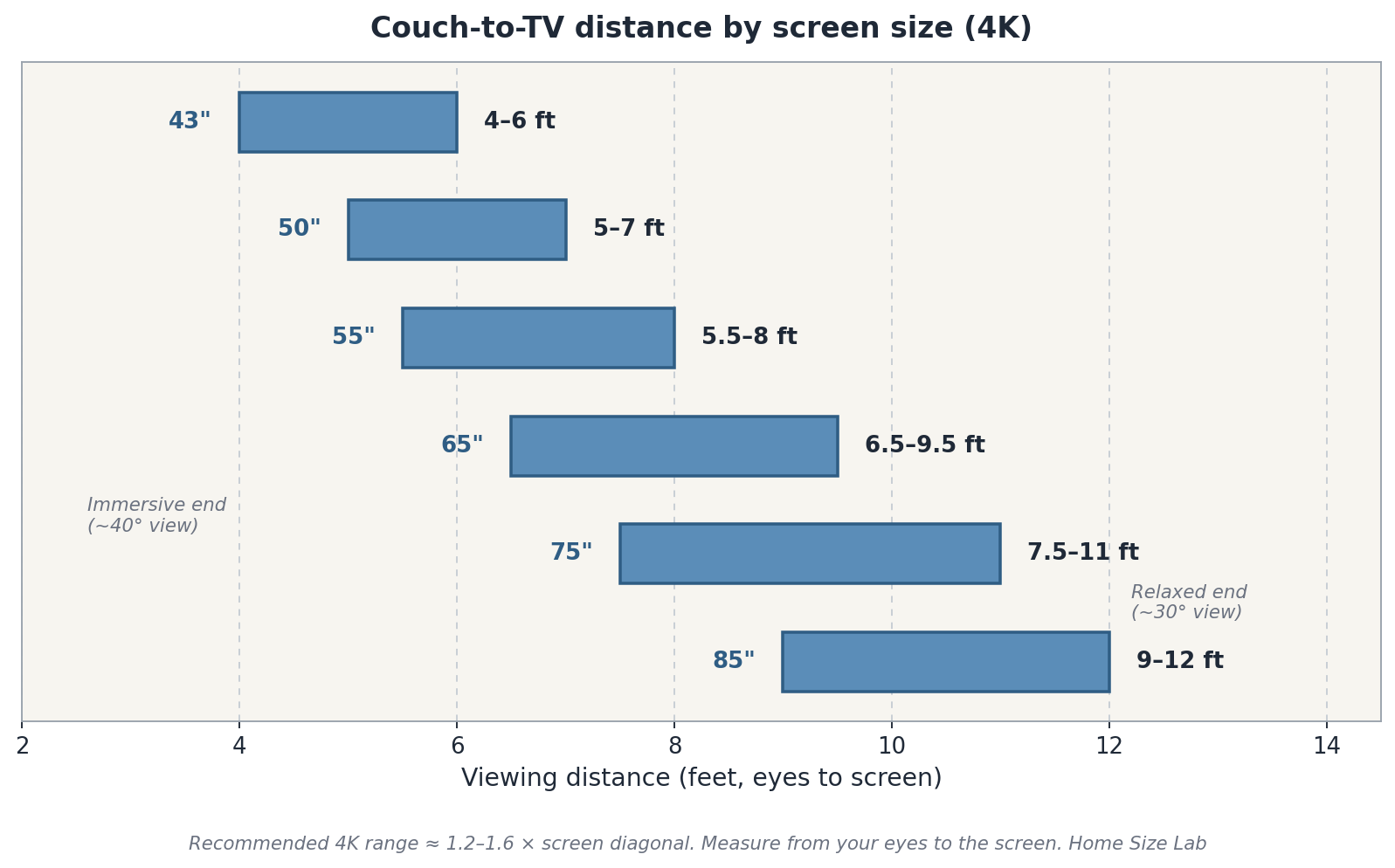
For a 4K TV, your couch should sit 1.2 to 1.6 times the screen’s diagonal away from the screen. That means a 55-inch TV belongs at 5.5 to 8 feet, a 65-inch at 6.5 to 9.5 feet. Measure from your eyes, not from the back of the sofa. The close end of the range feels cinematic; the far end feels relaxed. Both are legitimate, which is why different guides quote different numbers.
Get the distance wrong and one of two things happens: you sit so far back that your expensive 4K screen looks no sharper than an old 1080p set, or you sit so close that watching a match feels like the front row of a cinema. Exciting for ten minutes, exhausting for two hours.
The Quick Chart: Distance by Screen Size
This is the table to screenshot. Distances are measured from your eyes (seated) to the screen surface, in feet and meters, for 4K TVs:
| Screen size | Sweet spot (4K) | In meters | Immersive end | Relaxed end |
|---|---|---|---|---|
| 43″ | 4–6 ft | 1.2–1.8 m | 4 ft | 6 ft |
| 50″ | 5–7 ft | 1.5–2.1 m | 5 ft | 7 ft |
| 55″ | 5.5–8 ft | 1.7–2.4 m | 5.5 ft | 8 ft |
| 65″ | 6.5–9.5 ft | 2.0–2.9 m | 6.5 ft | 9.5 ft |
| 75″ | 7.5–11 ft | 2.3–3.4 m | 7.5 ft | 11 ft |
| 85″ | 9–12 ft | 2.7–3.7 m | 9 ft | 12 ft |
The “immersive” end of each range fills about 40 degrees of your field of view: the cinematic feel THX recommends for movies. The “relaxed” end fills about 30 degrees, the Society of Motion Picture and Television Engineers’ (SMPTE) minimum for general viewing. Most living rooms land happily somewhere in the middle.
Two things worth knowing before you pick a number. First, these ranges assume 4K resolution. If your TV is 1080p, sit farther, roughly 2 to 2.5 times the diagonal, because lower resolution shows its pixels up close. Second, these numbers work in reverse: if your couch is fixed 10 feet from the wall, the chart tells you a 75-inch screen is the sweet spot and an 85-inch still works.
The Simple Formula for Any Screen Size
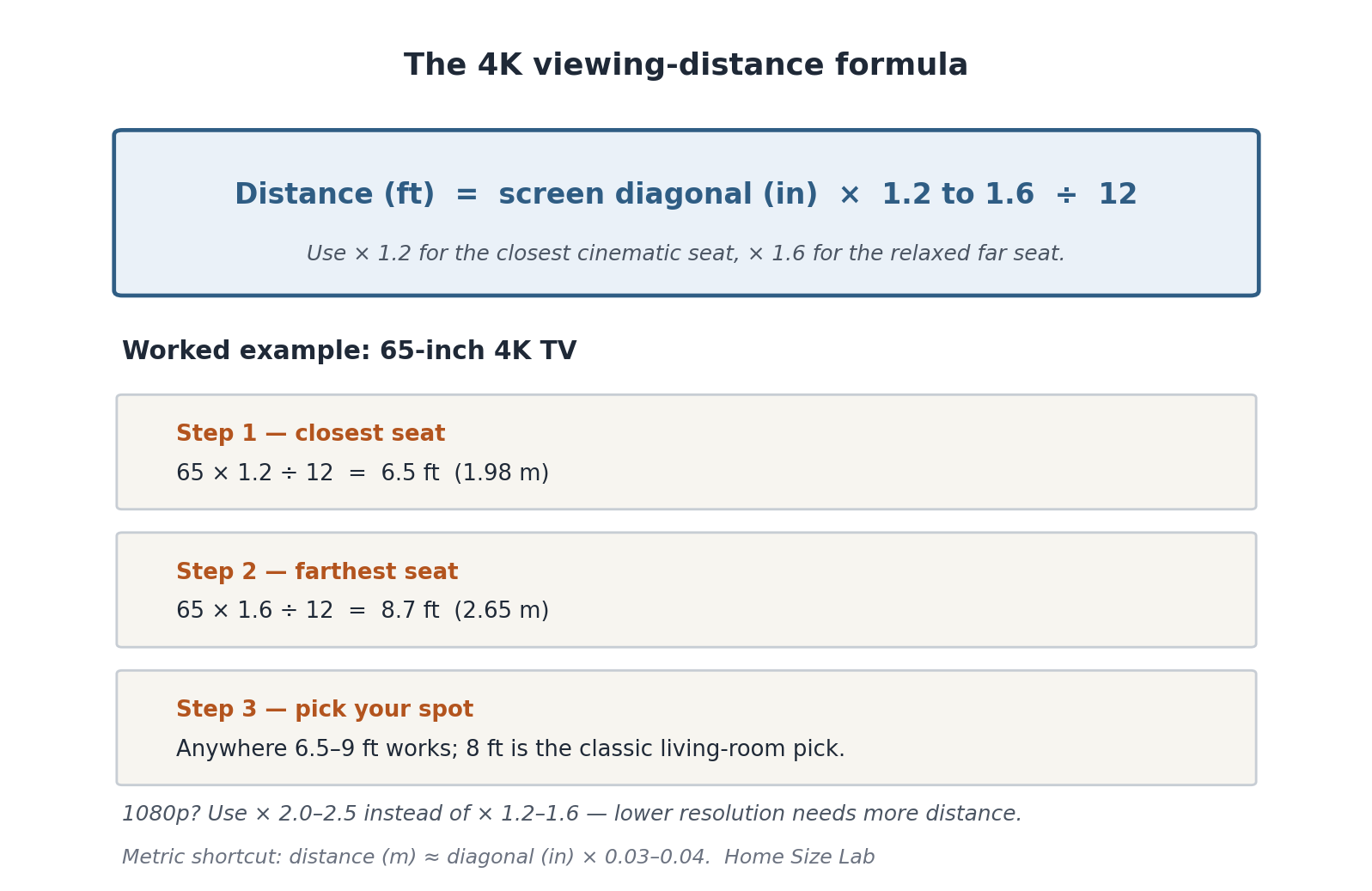
For a 4K TV, take the screen’s diagonal in inches, multiply by 1.2 for the closest comfortable seat and by 1.6 for the farthest seat where you still see the full 4K detail. Divide by 12 for feet:
Closest seat (feet) = diagonal × 1.2 ÷ 12
Farthest seat (feet) = diagonal × 1.6 ÷ 12
Worked example for a 65-inch TV: 65 × 1.2 ÷ 12 = 6.5 feet; 65 × 1.6 ÷ 12 = 8.7 feet. Round to 6.5–9 feet and you’re done. That matches the chart above.
Buying or mounting and just want one number? Use 1.4×: a 55-inch TV at 55 × 1.4 ÷ 12 ≈ 6.4 feet. Prefer metric? Multiply the diagonal in inches by 0.03 for the close end and 0.04 for the far end to get meters directly. A 65-inch TV gives 65 × 0.03 = 1.95 m to 65 × 0.04 = 2.6 m, right in line with the 2.0–2.9 m range in the table.
Why Different Guides Give Different Numbers
If you’ve ever wondered why Sony’s chart seems to let you sit much closer than a home-theater forum’s, it’s because they’re answering different questions.
Sony, the manufacturer, quotes the closest distance at which a 4K screen still looks perfectly sharp: about 1.5 times the screen’s vertical height. On Sony’s official BRAVIA size guide, a 55-inch TV is listed at 100 cm (about 3 ft 3 in), a 65-inch at 120 cm (about 3 ft 11 in), a 75-inch at 140 cm (about 4 ft 7 in), and an 85-inch at 160 cm (about 5 ft 3 in). That’s the maximum-immersion position. You’re close enough to resolve every pixel, which is exactly what shows off 4K. Nothing stops you from sitting there. It won’t damage your eyes, but most people find it intense for casual viewing.
Independent testers like RTings frame it around the SMPTE viewing-angle standards instead: at least 30 degrees of your field of view (about 1.6× the diagonal) for general content, and 40 degrees (about 1.2× the diagonal) for a cinematic feel. That’s where the 1.2–1.6× formula in this article comes from. Retailer Crutchfield’s 4K chart lands in the same territory: 4.6–6.9 feet for a 55-inch, 5.4–8.1 feet for a 65-inch.
So nobody’s wrong. Sony tells you how close you can sit; the angle-based guides tell you where most people want to sit. Use Sony’s numbers as the inner limit and the 1.2–1.6× range as your comfort zone.
Minimum vs. Comfortable: Reading the Range
Every range in the chart has two personalities. Which one you pick depends on what you watch:
- The immersive (close) end: best for movies, prestige TV, and gaming. The screen fills more of your vision, 4K detail is at its most obvious, and sports feel bigger. The tradeoff: fast camera movement can feel overwhelming, and you’ll notice lower-quality streams more.
- The relaxed (far) end: best for news, daytime TV, and households where people watch from different seats. Nobody strains, off-angle seats still see a good picture, and the room feels calmer. The tradeoff: you see less of the 4K advantage you paid for.
If your household does both, aim for the middle of the range and let the recliner, not the measuring tape, decide the rest. A 65-inch TV at 8 feet is the classic living-room compromise.
One more practical factor: wall-mounting versus a stand. A wall-mounted TV usually sits 4–6 inches closer to the wall than one on a deep media console, which can buy you half a foot of viewing distance in a tight room. A mounted screen can also sit slightly higher with a tilt, but keep the center of the screen near seated eye level: roughly 42 inches off the floor for an average sofa.
How to Measure: Eyes to Screen, Not Sofa to Wall
Almost everyone measures this wrong the first time. The correct method:
1. Sit where you actually sit. Not the middle of the sofa: your spot. Slouch the way you really slouch. Your eye position when relaxed is what counts, and it can be a full foot behind where you think.
2. Measure from your eyes to where the screen will be. Have someone hold the tape at your eye level (or mark the wall with painter’s tape). Measure to the wall or console surface where the screen’s face will sit, not to the wall behind a deep TV stand. For a TV on an 18-inch-deep console, the screen face is roughly 16–18 inches closer to you than the wall.
3. Account for recline. A reclined seat moves your eyes up and back: typically 6–12 inches farther from the screen than sitting upright. If the main seat is a recliner, measure reclined.
4. Check the vertical angle too. The center of the screen should sit roughly at seated eye level, about 40–44 inches off the floor for a standard sofa. If the TV must go higher (over a fireplace, for example), add a tilting mount. Also check coffee table height: a tabletop level with or just below the seat cushion won’t block the bottom of the screen. A high screen still tires your neck and eyes faster than sitting a little too far ever will.
5. Walk the room depth. Your viewing distance can’t exceed your room. Measure wall to wall, subtract the TV’s depth off the wall (a few inches mounted, up to 20 inches on a console) and subtract the sofa’s depth plus a walkway behind it if the sofa floats. What’s left is your maximum viewing distance. Check it against the chart. This is also where the space between sofa and coffee table matters: you need that 14–18 inch gap in your floor plan before you finalize where the couch sits. Room depth also decides seating — see how to plan sofa size for living room.
Common Mistakes to Avoid
Measuring from the sofa’s back instead of your eyes. A deep sofa can put your eyes 2 feet in front of its backrest. Measure from where your head actually is, and you might discover you have room for a bigger screen than you thought.
Sizing the TV to the wall, not the seating. A 75-inch TV on a big blank wall looks right in the store and overwhelming at 7 feet. Always size to the seating distance first, wall second.
Forgetting the second row of seats. If there’s an armchair or a second sofa behind the main one, check its distance too. The back row of a 12-foot room with an 85-inch TV is at the relaxed end, which is fine. The back row with a 55-inch TV is watching a postage stamp.
Mounting too high to “fix” a short distance. Raising the TV doesn’t change the viewing distance to your eyes in any meaningful way. It just adds neck strain. If the room is short, choose the smaller screen or move the seating. Don’t crank the mount upward.
Ignoring 1080p content. Your 4K TV still shows plenty of 1080p: cable, older streaming, some sports. 1080p wants 2–2.5× the diagonal. If half your viewing is lower resolution, bias toward the relaxed end of the 4K range. It’s the best compromise for mixed content.
Blocking the walkway to gain six inches. Pushing the sofa against the back wall for extra distance kills the room’s flow. Keep at least 30 inches of walkway behind a floating sofa. A comfortable room beats a theoretically perfect viewing angle.
Frequently Asked Questions
How far should a couch be from a 55-inch TV?
About 5.5 to 8 feet (1.7–2.4 m) from your eyes to the screen for 4K. Use 5.5–6.5 feet for a cinematic feel with movies and gaming, 7–8 feet for relaxed everyday viewing. Sony’s own guidance allows as close as about 3 ft 3 in (100 cm) without losing sharpness, but most people find that intense.
What about a 65-inch TV?
About 6.5 to 9.5 feet (2.0–2.9 m) eye-to-screen for 4K. Eight feet is the classic living-room sweet spot. Sony lists the closest sharp-viewing position at about 3 ft 11 in (120 cm). That’s usable, but the 6.5–9.5 foot range is where most households are comfortable.
Can you sit too close to a 4K TV?
Not in a way that harms your eyes. That’s a myth. 4K pixels are so dense they’re hard to see individually even up close. “Too close” just means uncomfortable: eye fatigue from scanning a huge image, motion that feels overwhelming, and lower-quality content looking worse. If it feels fine after a full movie, your distance is fine.
Does the rule change for 1080p TVs?
Yes. Sit farther. For 1080p, use roughly 2 to 2.5 times the diagonal: a 55-inch 1080p TV wants about 9–11.5 feet. The pixels are four times larger than 4K, so they become visible much sooner. This is also why the relaxed end of the 4K range is the smart pick if you watch a lot of non-4K content.
Should I measure from the couch or from my eyes?
From your eyes, always. Two people on the same sofa can have eye positions a foot apart depending on how they sit. Measure seated, in your usual posture, to the screen surface. And remember: a TV on a deep console sits over a foot closer to you than the wall behind it.
Is a bigger TV always better if the distance works?
Usually yes, within reason. The most common buyer’s regret is going too small, because the chart’s distances assume you want to see the 4K detail you paid for. But respect the room: if the TV dominates the wall and the nearest seat is inside the immersive end of the range, the next size down will be more comfortable.
Pick your screen size, run the 1.2–1.6× formula, and measure from your eyes. That’s the whole method. The chart gives you the range, the formula covers any size, and your own comfort picks the exact spot. Get those three right and the TV fits the room instead of fighting it.

1 Comment
Pingback: TV Stand Dimensions by Screen Size (Chart)