


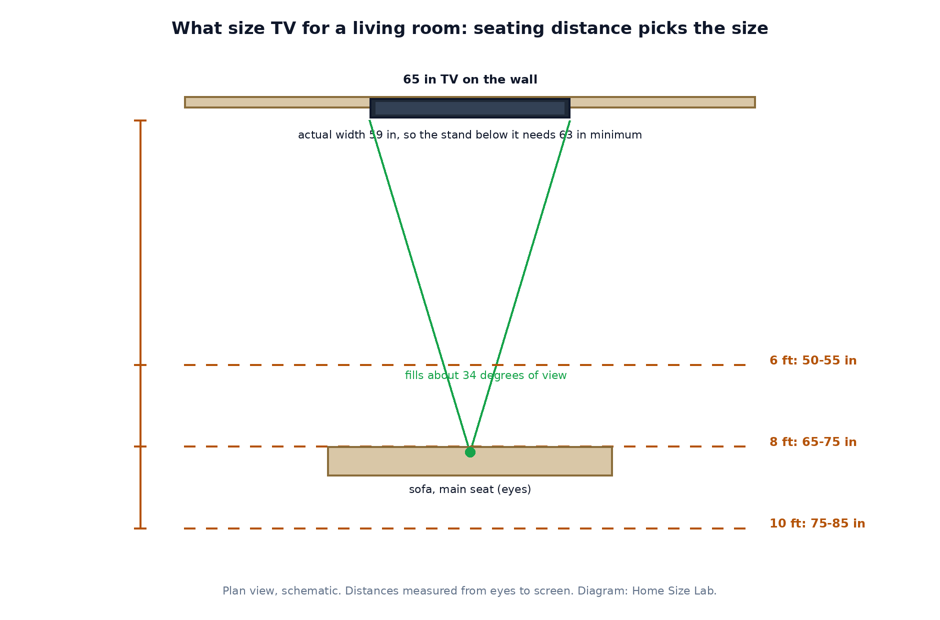
For most living rooms the seat decides the screen. Measure from your main seat to the TV wall in inches, divide by 1.6 for a relaxed picture and by 1.2 for a cinematic one, and buy the standard size inside that range. At 8 feet, the most common seat distance, that is 60 to 80 inches, so a 65 or 75-inch TV. One more check before you pay: the set’s real width against your stand.
What is the right TV size for a living room?
The right TV size for a living room is the screen diagonal that fills 30 to 40 degrees of your view from the main seat, no more and no less. In practice that means a diagonal between your seating distance in inches divided by 1.6 and divided by 1.2, in a standard size your stand can actually hold.
TV size chart by seating distance
Two numbers bracket every seat. The relaxed end comes from the Society of Motion Picture and Television Engineers (SMPTE), which sets 30 degrees of horizontal view as the minimum for general viewing. The cinematic end comes from THX, which recommends 36 to 40 degrees for movies. Buy the standard size that falls inside your bracket:
| Seating distance | Relaxed size (SMPTE 30 degrees) | Cinematic size (THX 40 degrees) | Standard sizes to buy |
|---|---|---|---|
| 6 ft (72 in) | 45 in | 60 in | 50 or 55 in |
| 7 ft (84 in) | 53 in | 70 in | 55 or 65 in |
| 8 ft (96 in) | 60 in | 80 in | 65 or 75 in |
| 9 ft (108 in) | 68 in | 90 in | 75 or 85 in |
| 10 ft (120 in) | 75 in | 100 in | 75 or 85 in |
| 12 ft (144 in) | 90 in | 120 in | 85 or 98 in |
Worked example at 8 feet: 96 divided by 1.6 is 60, and 96 divided by 1.2 is 80. No mainstream line sells a 60 or 80-inch living room TV, so the bracket resolves to the standard sizes inside it, 65 and 75 inches. Pick 65 for mixed daily viewing and 75 if the seat is mostly for films and sport. Our TV size calculator runs the same math for any distance you type in, and our guide to couch-to-tv distance gives the distance range for each screen size in the other direction, including older 1080p sets.
How to size a TV for your living room in four steps
- Measure from your main seat, where your eyes actually rest, to the wall or stand face where the screen will sit. Record it in inches.
- Divide the measurement by 1.6 and by 1.2. The two results are your size bracket, relaxed to cinematic.
- Snap the bracket to the standard sizes sold everywhere: 43, 50, 55, 65, 75, 85 and 98 inches. If you land between two sizes and watch mostly movies, take the larger one; if the room is for news and casual shows, the smaller one is fine.
- Run the stand check in the next section before you order. A screen that wins on distance can still lose on furniture.
The formulas, for anyone who wants them on paper: screen diagonal = seating distance in inches / 1.6 at the relaxed end, and / 1.2 at the cinematic end. They are the same two viewing angles, 30 and 40 degrees, expressed as divisors.
The check most guides skip: actual width vs your stand
Here is where living room TV purchases go wrong. The size on the box is a diagonal. Your stand does not care about diagonals; it holds a width. For a 16:9 screen, the width is the diagonal multiplied by 0.8716, and the cabinet still has to swallow the frame around it. Samsung’s own dimension sheets put a typical 55-inch set at 48.5 inches wide and a 65-inch set at 57.1 inches wide, panel and frame only. The planning widths below add the small frame-and-feet allowance used in our stand guide, so a console bought from this table never comes up short:
| TV size | Screen width | Actual width to plan around | Minimum stand width | Comfortable stand width |
|---|---|---|---|---|
| 43 in | 37.5 in | ~40 in | 44 in | 46-48 in |
| 50 in | 43.6 in | ~46 in | 50 in | 52-54 in |
| 55 in | 47.9 in | ~50 in | 54 in | 56-58 in |
| 65 in | 56.7 in | ~59 in | 63 in | 65-67 in |
| 75 in | 65.4 in | ~67 in | 71 in | 73-75 in |
| 85 in | 74.1 in | ~76 in | 80 in | 82-84 in |
Worked example of a failed check: a 65-inch TV on the 60-inch console already in the room. The TV plans at about 59 inches wide, which leaves 1 inch of spare console in total, half an inch per side, and on many 65-inch sets the feet sit near the ends of the panel, right at the console’s edges. The rule from our TV stand dimensions guide asks for the stand to beat the TV’s width by at least 4 inches, so this pairing wants a 63-inch console, not a 60. Either size the console up, drop to a 55-inch TV, or wall-mount the 65 and let the console hold everything else. The stand guide also carries the height math (screen centre at seated eye level, about 42 inches) and the depth range, if you are buying the furniture in the same trip.
If you wall-mount instead, run the same width number against your wall space between windows, doors and art. A 75-inch set is 67 inches of physical width before you leave any breathing room around it.
What size TV for a small, medium or large living room?
Room size on its own does not pick a TV. It matters only because it decides where the sofa can land, and the sofa decides the distance. Still, most rooms fall into three patterns:
| Living room size | Typical seating distance | TV size that fits |
|---|---|---|
| Small, about 10 x 12 ft | 6 to 7 ft | 55 to 65 in |
| Medium, about 12 x 16 ft | 8 to 9 ft | 65 to 75 in |
| Large, 14 x 20 ft or open plan | 10 to 12 ft | 75 to 85 in |
Treat the middle column as the honest estimate, then measure your own room before trusting it. Layout moves the number more than the room label does: an L-shaped sectional pulled a foot closer to the screen drops a large room into the 65-inch bracket, and a sofa floated off the wall in a medium room can push a 75-inch set into range. Our guide to sofa size for a living room works through the layout math that sets your real seating position.
Does 4K change the size you should buy?
Not the bracket, only how safe the cinematic end feels. The 30 to 40 degree angles describe immersion, and they hold at any resolution. What 4K changes is the penalty for sitting close: with four times the pixels of a 1080p set, you stop seeing pixel structure much sooner. Sony’s BRAVIA guidance puts the closest sensible 4K seat at about 1.5 times the screen height, roughly 4 feet for a 65-inch set, well inside the THX end of the chart. So with a 4K TV, buy toward the cinematic end of your bracket without worry. With a 1080p set, stay at or beyond the relaxed end; the distance guide linked above has the longer ranges those sets need.
Frequently asked questions
Is a 75-inch TV too big for a living room?
Only if your seat is closer than about 7.5 feet. A 75-inch screen hits the cinematic 40 degree mark at 7.5 feet (75 x 1.2 = 90 inches) and the relaxed SMPTE mark at 10 feet (75 x 1.6 = 120 inches). Between those seats it is not too big at all; it is the chart’s answer. Below 7.5 feet it starts to fill more view than THX recommends, and fast scenes can feel like the front row.
What size TV for a 12 x 12 living room?
Work it from the seat, not the room label. A 12 x 12 room is 144 inches deep. Take away about 20 inches for the console zone at the TV wall and about 36 inches from the back wall to your eyes on the sofa, and the viewing distance lands near 88 inches, about 7.3 feet. That bracket is 55 to 73 inches, so a 65-inch TV is the sweet spot, with a 75 only if you wall-mount and pull the sofa as far back as it goes.
How wide is a 65-inch TV, really?
The screen itself is 56.7 inches wide (65 x 0.8716). Samsung’s dimension sheet for a typical 65-inch set lists 57.1 inches including the frame, and the width to plan furniture around is about 59 inches once the feet are accounted for. That is why a 65-inch TV wants a stand at least 63 inches wide, a number no diagonal on a box will ever tell you.
Should I size the TV by room size or by seating distance?
By seating distance, every time. Two living rooms with identical floor plans can land a full size apart because one floats the sofa mid-room and the other pushes it to the wall. Room dimensions are still useful as a sanity check on the layout, which is what the room table above is for, but the tape measure between your seat and the screen is the number that picks the TV.
Putting it together
A living room TV purchase is really two decisions wearing one label. Distance picks the diagonal: measure the seat, divide by 1.6 and 1.2, and buy the standard size inside the bracket. Width decides whether it works in the room: check the actual inches against your stand or wall before the order, not after the delivery truck leaves. Get both right and the TV simply fits the room, which is the whole point.
Sources
- TV Calculator, viewing angle size chart (recommended sizes at 30, 36 and 40 degree viewing angles by seating distance)
- Sony, BRAVIA recommended viewing distance guide (minimum 4K viewing distance of about 1.5 times the screen height, with per-size distances)
- Sony, TV placement tips help guide (eyes level with the centre of the screen; distance of 2 to 5 times the diagonal)
- Samsung, The Frame LS03D dimension sheet (official set dimensions in millimetres for 43 to 85-inch models)
- Smart Home Starter, Samsung TV dimensions guide (model-by-model widths compiled from Samsung specifications: 48.5 in at 55 inches, 57.1 in at 65 inches)
- TCL, how to choose a TV size (distance divided by 1.5 rule, and the diagonal-versus-width mistake)
- The Big Screen Store, TV size guide (retailer seating-distance ranges for typical living rooms)

3 Comments
Pingback: How to Choose the Right Sofa Size for Your Room
Pingback: TV Stand Dimensions by Screen Size (Chart)
Pingback: Couch-to-TV Distance Chart by Screen Size