


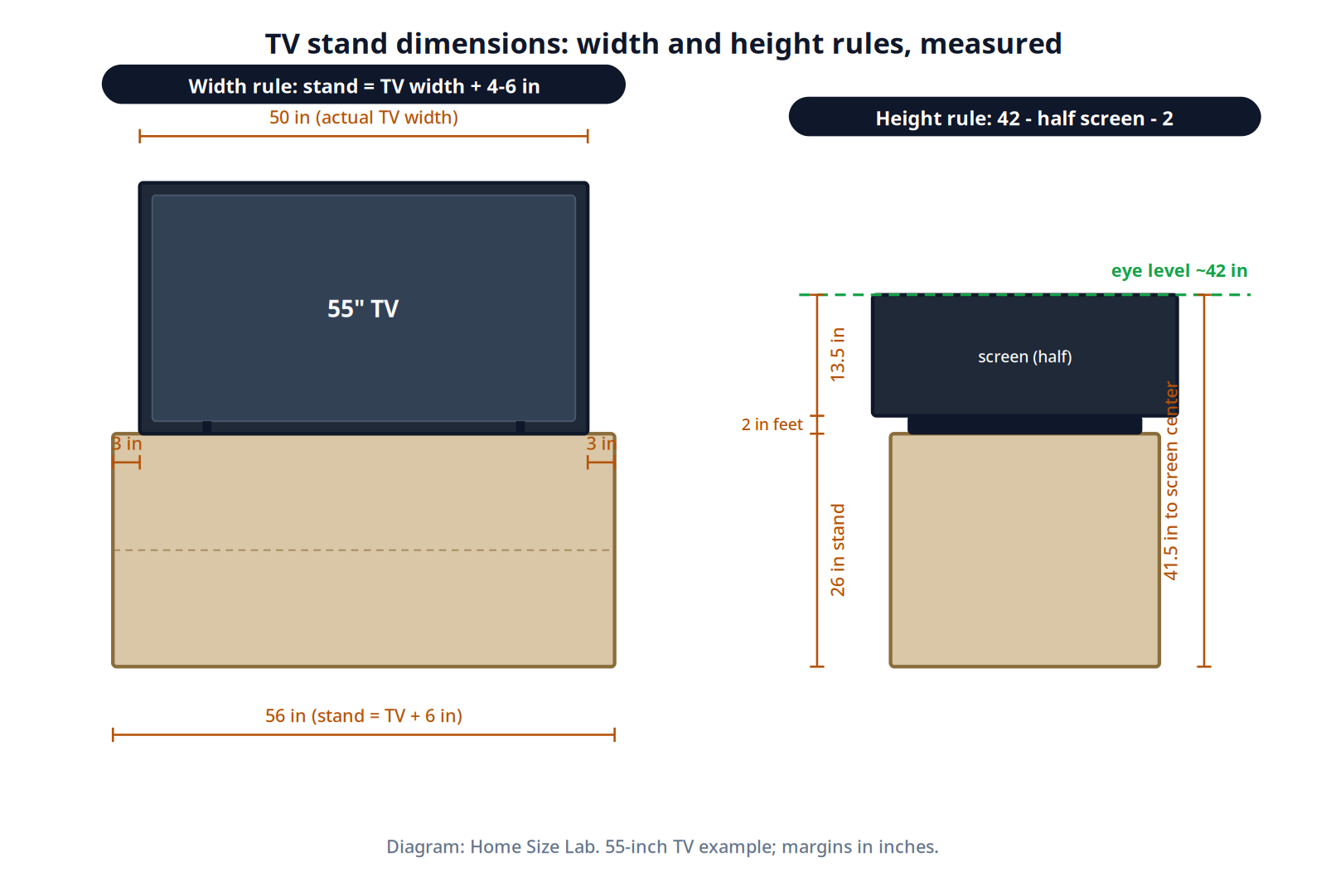
A TV stand should be 4 to 8 inches wider than your television’s actual width, which is roughly 87 percent of its advertised diagonal size. That means a 55-inch TV, about 50 inches wide edge to edge, needs a stand 54 to 58 inches wide. Stand height should put the screen center at your seated eye level, about 42 inches off the floor.
What are standard TV stand dimensions?
TV stand dimensions are the width, height, and depth of the console or cabinet holding a television. A standard stand is 4 to 8 inches wider than the TV it holds, 20 to 30 inches tall, and 16 to 20 inches deep. Size it from the TV’s actual edge-to-edge width, not the diagonal size on the box.
The one rule: stand width follows TV width
TV makers advertise the diagonal screen size, but stands are built for width. The rule that every sizing guide agrees on: your stand should be at least as wide as the TV, and 2 to 4 inches wider on each side looks right and stays stable. In practice that means adding 4 to 8 inches to the TV’s actual width.
Actual width is not the diagonal number. A 16:9 screen’s width is about 87 percent of its diagonal, so a 55-inch TV’s screen is 47.9 inches wide before the bezel. Add roughly 2 inches for the frame and feet, and the real number to size from is about 50 inches.
TV stand width chart by screen size
This is the subtraction no product page shows you: screen diagonal, actual TV width, then stand width with the 4-to-8-inch rule applied.
| TV size (diagonal) | Actual TV width | Minimum stand width | Comfortable stand width |
|---|---|---|---|
| 43 in | ~40 in | 44 in | 46-48 in |
| 50 in | ~46 in | 50 in | 52-54 in |
| 55 in | ~50 in | 54 in | 56-58 in |
| 65 in | ~59 in | 63 in | 65-67 in |
| 75 in | ~67 in | 71 in | 73-75 in |
Worked example for the most common case: a 55-inch TV. Its visible screen is 47.9 inches wide; with the bezel it measures about 50 inches edge to edge. Add 4 inches for the minimum and you get a 54-inch stand, with 2 inches of breathing room per side. Go up to 58 inches and each side gets 4 inches, which is the look most living rooms settle on. If your number lands between two retail sizes, size up. A stand that is slightly generous looks intentional; one the TV overhangs looks unstable.
Two cautions before you shop. First, measure your own TV if you have it, frame edge to frame edge, because bezels vary by model and the chart uses typical values. Second, retailers list stands in rough width bands (40-45, 50-55, 60-70 inches), so pick the band whose lower end still clears your minimum.
TV stand height: do the eye-level math
Height is where most people guess wrong, usually too tall. The target is simple: the center of the screen should sit at your seated eye level, which for most sofas is 40 to 44 inches off the floor. Use 42 inches as your planning number, then subtract half the screen height and about 2 inches for the TV’s feet.
Stand height = 42 – (screen height / 2) – 2
| TV size | Screen height | Ideal stand height |
|---|---|---|
| 43 in | 21 in | 29 in |
| 50 in | 25 in | 28 in |
| 55 in | 27 in | 26 in |
| 65 in | 32 in | 24 in |
| 75 in | 37 in | 22 in |
Notice the pattern most guides skip: bigger TVs need shorter stands. A 75-inch screen is 37 inches tall, so half of it already eats 18.5 inches of your 42-inch budget and the stand only needs to be about 22 inches. That is why a 24-inch console, the most common retail height, works well for 55 to 65-inch TVs on standard seating. If your sofa is unusually low or high, measure your own seated eye level and rerun the subtraction rather than trusting the chart. Our guide to standard sofa dimensions gives the seat heights that set your eye level in the first place.
One exception: a soundbar sitting in front of the TV can block the bottom of the screen on a low stand. If that is your setup, either raise the stand an inch or two or plan the soundbar height into the math.
TV stand depth: 16 to 20 inches
Depth matters less for the TV itself, which is only a few inches thick, and more for everything else on the stand. Plan on a minimum of 16 inches deep, with 16 to 20 inches as the comfortable range for most setups. That leaves room for:
- The TV’s feet or pedestal base with no overhang at the back or front
- A soundbar in front of the TV without blocking the screen
- A game console or streaming box beside or behind the TV
- Two to three inches of clear space behind equipment for cables and airflow
Closed cabinets need rear cutouts or ventilated doors so heat can escape and remotes still work through the glass. If your console will hold a receiver or a PlayStation 5, favor the deeper end of the range and confirm the shelf depth fits the device with cables attached.
VESA patterns and weight limits
If your stand has a built-in mount, or you plan to attach the TV to a bracket on the stand, check the VESA pattern: the four mounting holes on the TV’s back, measured in millimeters. Common patterns by size are 200×200 for 43 to 50-inch TVs, 400×400 for 55 to 65-inch TVs, and 400×400 or 600×400 for 75-inch and larger. Patterns vary by brand and model year, so confirm against your TV’s spec sheet rather than the size alone.
Weight matters too. A 55-inch TV typically weighs 30 to 50 pounds; larger screens run 50 to 80 pounds. Choose a stand rated comfortably above your TV’s weight, and anchor tall consoles to the wall with an anti-tip kit. The U.S. Consumer Product Safety Commission’s Anchor It! guidance recommends anchoring both the TV and the furniture, which is cheap insurance in homes with kids or pets.
Cord management
Look for built-in pass-throughs or rear access holes to route power and HDMI neatly. Run cables through the stand’s interior rather than down the back where they show, and leave that 2 to 3 inches of space behind components so you can reach connections later without pulling everything out.
Can a TV be wider than the stand?
No. A TV that overhangs its stand looks top-heavy and creates a real tipping risk, and no styling fixes it. The stand should be at least 4 inches wider than the TV on total width; 4 to 8 inches wider is the comfortable target used through this guide.
How far should I sit from the TV?
Viewing distance is a separate calculation from stand size, based on screen size and resolution. Our guide to couch-to-tv distance walks through the full distance math for every common screen size, so pair this page’s stand numbers with that page’s seating numbers.
A note on rugs in the media zone
A rug under the media console ties the seating and the screen into one zone. Size it like any living room rug, with the front legs of the seating on it, as our living room rug size guide shows.
Sources
- HomeStyleCalculator, TV dimensions chart (visible screen widths for 24 to 115-inch TVs)
- Size-Charts.com, TV screen size guide (screen widths and stand width requirements by size)
- HomeBaa, TV stand size guide (stand width formula, depth range, and seated eye level)
- Sicotas, how to choose a TV stand (stand height formula with size-by-size comfort ranges)
- Belleze, TV stand size guide (retail width categories and the 4-to-12-inch wider rule)
- CozyFurnish, choosing a TV stand for a 55-inch TV (height 24-30 inches and depth 16-22 inches)
- FITUEYES, 55-inch TV stand guide (actual 55-inch TV width and cabinet width guidance)
- EatHealthy365, modern TV stand sizing guide (minimum 16-inch depth and component clearance)
