


Standard desk dimensions are 48 to 72 inches wide, 24 to 30 inches deep, and 28 to 30 inches tall. That is the short answer. The number that matters most depends on your setup: a laptop needs the minimum, a dual-monitor workstation needs 60 inches of width, and a large monitor needs 30 inches of depth more than it needs extra width. The math below pins down your exact size.
A desk is a work surface sized to its task. Standard office desk dimensions are 60 inches wide by 30 inches deep by 29 inches tall, which fits a monitor, keyboard, and paperwork with room to spare. Compact writing desks start near 32 inches wide, while L-shaped desks add a 48 to 58-inch return for a second work zone.
Standard desk dimensions chart
Every dimensions-of-a-desk guide repeats the same three numbers, but few say which desk types they describe. The chart below lists the most common desk dimensions by type, with the use case each type serves.
| Desk type | Width | Depth | Height | Best for |
|---|---|---|---|---|
| Standard office desk | 48-72 in | 24-30 in | 28-30 in | Everyday computer work |
| Writing / student desk | 30-60 in | 18-24 in | 28-30 in | Light work, compact spaces |
| Compact desk | 36-48 in | 18-24 in | 28-30 in | Apartments, dorms |
| Computer / gaming desk | 48-72 in | 24-30 in | 28-30 in | Single or dual monitors |
| L-shaped desk | 60-72 in (per side) | 20-30 in | 29-30 in | Corner setups, two work zones |
| Executive desk | 60-72 in | 30-36 in | 29-30 in | Large offices, multi-screen |
| Sit-stand desk | 48-72 in | 24-30 in | 24-50 in (adjustable) | Sitting and standing |
The three numbers are not arbitrary. Width sets your side-to-side surface, depth sets how far back a monitor can sit, and height decides whether your elbows rest near 90 degrees. Standard sizes hold steady across manufacturers because they track average human proportions and common equipment footprints. Most fixed-height desks land near a 29-inch top, which fits the average seated adult paired with an office chair.
Desk depth: the measurement that decides everything
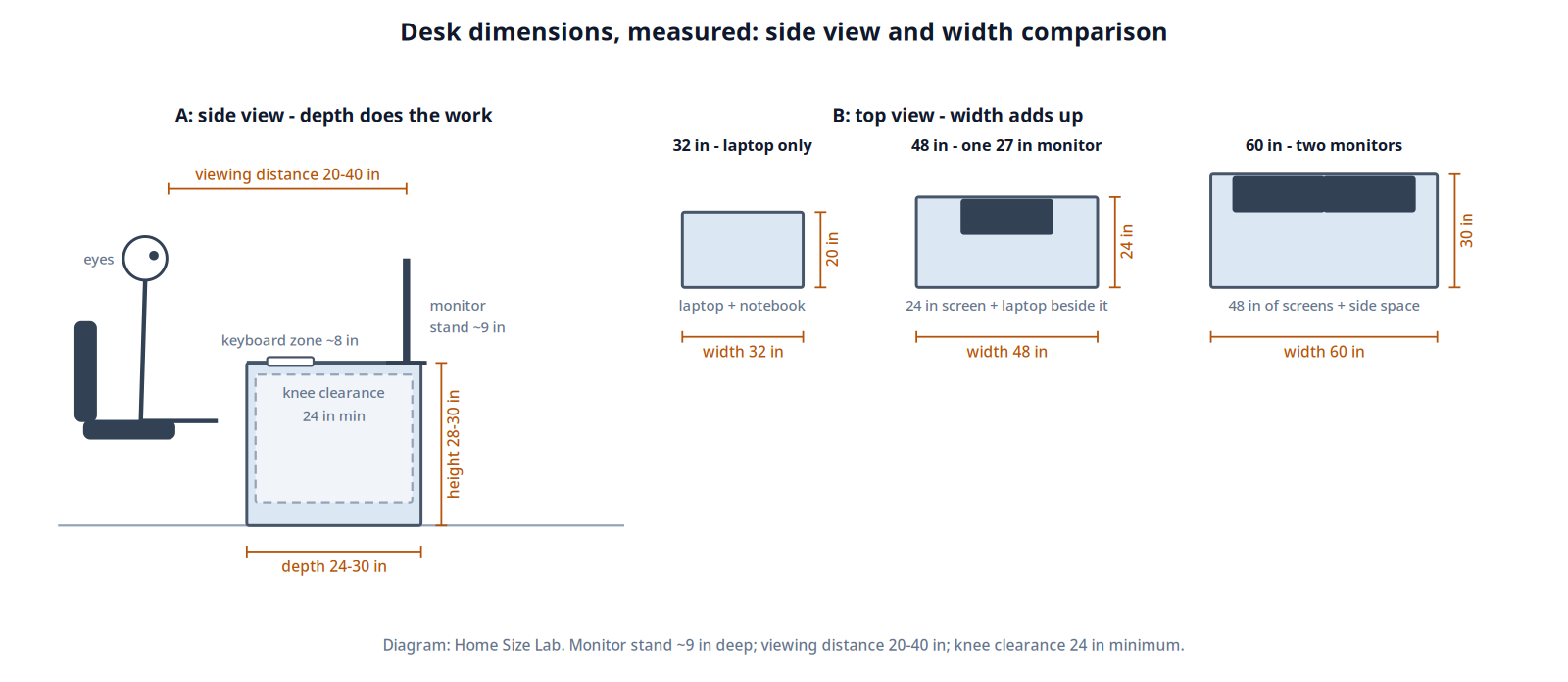
Depth is where desk guides get vague and buyers get burned, because depth is a subtraction problem. Three things compete for it: the monitor stand footprint, the keyboard and wrist zone, and the viewing distance between your eyes and the screen. Run the numbers on a 24-inch desk:
- Monitor stand footprint: 8 to 10 inches
- Keyboard and wrist zone: about 8 inches
- Front edge breathing room: about 2 inches
- Left for viewing distance: 24 minus 18 to 20 leaves roughly 20 to 22 inches of eye-to-screen distance
Twenty inches is the floor of the recommended range. Ergonomic guidance, including OSHA’s computer workstation guidance, puts preferred monitor viewing distance at 20 to 40 inches from eye to screen. So 24 inches of depth is the working minimum: it fits a laptop or a single monitor at the near edge of comfortable viewing, but nothing more. A 30-inch desk moves the same subtraction to roughly 28 to 32 inches of viewing distance, which is why 30 inches is the “buy it if your room allows it” depth.
| Setup | Minimum depth | Why |
|---|---|---|
| Laptop only | 20 in | Laptop screens sit closer; the screen-to-eye distance stays comfortable |
| Single 24-27 in monitor | 24 in | Viewing distance lands at 20-24 in, the near end of the range |
| Dual monitors or 32 in screen | 30 in | Viewing distance reaches 28-34 in; side monitors angle without crowding |
| Triple monitor or ultrawide 34 in+ | 30-36 in | Large panels need 1.0 to 1.5 times their diagonal in viewing distance |
One upgrade changes the depth math completely: a monitor arm. Swapping a factory stand for an arm reclaims the 8 to 10 inches the stand footprint eats. On a 24-inch desk, that moves the screen back far enough to give you the viewing distance of a 30-inch desk. If your desk is already bought and feels too shallow, an arm is the cheapest fix.
Desk width by setup
Width is an addition problem: add up what sits on the surface and give each item a few inches of clearance. A 27-inch 16:9 monitor is about 24 inches wide. Two of them side by side need 48 inches before you have placed a single speaker, lamp, or notebook. Add 6 inches of side space on each end and you land at 60 inches. The common “60-inch desk for dual monitors” rule is not lore; it is arithmetic.
- Laptop plus notebook: 32 to 40 inches is enough. A 14-inch laptop is about 13 inches wide; the notebook and a mug fill the rest.
- Single monitor plus laptop beside it: about 48 inches. The monitor takes 22 to 24 inches, the open laptop about 14, and margins take the rest.
- Dual monitors: 60 inches minimum, 72 if you want real side space.
- Gaming with a 32-inch screen: width matters less than depth, but 60 inches keeps the keyboard, mouse pad, and PC accessories from crowding the panel.
The average desk dimensions most homes actually buy are 48 inches wide by 24 inches deep. That is the smallest standard office desk: it takes a laptop and keyboard or a single monitor with a little room on each side. If your setup already includes two screens, skip straight to 60 inches.
Small desk dimensions: the minimums that still work
Small desk dimensions start where standard desks stop shrinking. Writing desks run 30 to 60 inches wide and 18 to 24 inches deep; compact desks run 36 to 48 inches wide at the same depths. The practical floor for a usable desk is about 32 inches wide and 20 inches deep: enough for a laptop, a notebook, and nothing you will miss.
Students scale by height and grade. Younger kids work fine at 36 inches wide; graduate-level work with a monitor and textbooks needs the full 48 to 72-inch range. If the desk sits in a bedroom nook, measure the nook first and buy the standard size under it, not the size you wish fit.
Desk height and legroom
Standard desk height is 28 to 30 inches, and most fixed desks sit at 29. The test is your elbows: seated in your office chair, your elbows should rest near 90 degrees with forearms parallel to the floor. If the desk is too high, your shoulders hunch; too low, and your wrists bend upward to reach the keyboard. This is the same surface-height logic behind matching coffee table height to sofa seat height: the work surface must meet the seated user, which our guide to coffee table height versus sofa height breaks down for living rooms.
Legroom has its own minimums. Knee clearance under the desk should be at least 24 inches wide and 24 inches tall. A 30-inch desk with a 1-inch top leaves 29 inches of knee height, which clears the minimum easily. Watch out for pedestal drawers on both sides: they eat the knee width, so check that at least 24 inches of clear width remains between them. Keep the CPU tower on the floor or on a side stand rather than under the desk where it steals legroom.
Sit-stand desks solve height arguments by adjusting, typically across a range near 24 to 50 inches. Set your sitting height by the elbow test above, then set standing height the same way: elbows near 90 degrees, monitor top at or just below eye level. A keyboard tray adds about 4 inches of effective adjustability if your frame range runs short.
L-shaped desk dimensions
L-shaped desk dimensions are 60 to 72 inches on the long side, 48 to 58 inches on the return, 20 to 30 inches deep, and 29 to 30 inches tall. The return is the short arm of the L; its depth is usually 18 to 24 inches, sized for a printer, a laptop, or paperwork rather than a second full workstation.
The corner is where the L earns its keep. With two 24-inch-deep runs meeting at a corner, the diagonal depth at the corner is 24 times the square root of 2, about 34 inches. That is roughly 40 percent more depth than a straight 24-inch desk gives you, which is why an L-shaped desk holds a deep monitor setup in a corner where a straight desk would fail. Park the main monitor in the corner and use the runs for the keyboard zone and secondary tasks.
Measure the corner before buying. You need clear wall on both sides for the full run lengths, plus 33 to 36 inches of chair and pull-out clearance in front of each seated side. A 60 by 60-inch L needs a corner with about 60 inches of open wall each way and a room deep enough to hold the chair zone in front of it. Cable management matters more on an L because the corner hides the cables; route them before you push the desk into place.
Fitting the desk in the room
Buying the right desk dimensions means nothing if the desk does not fit the room. Measure in this order:
- Measure the wall or nook where the desk goes. Write down the exact inches, not the rounded feet.
- Pick your desk depth from the use-case tables above, based on your monitor setup.
- Add the chair zone: 33 to 36 inches behind the desk for the chair, getting in, and pushing back.
- Add a walkway: at least 24 inches if anyone walks behind the chair. Worked example: a 30-inch desk plus a 36-inch chair zone plus a 24-inch walkway needs 90 inches, or 7.5 feet, of room depth.
- Check the doorway. Desks wider than 60 inches usually ship flat-packed, but an assembled desk must clear the doorframe and any tight turn. Our guide to measuring furniture for doorways walks through the diagonal math for getting wide pieces through narrow openings.
Tape the footprint on the floor before you order. Mark the desk rectangle plus the chair zone with painter’s tape and sit in the space for a day. It costs nothing and catches the mistakes a tape measure misses.
A note on reception desks
Reception desks are a different animal: transaction counters, visitor-facing heights, and waiting-area traffic flow, not monitor ergonomics. They get their own dedicated guide, which is coming next in this series. Everything above covers home and office desks only.
What is the standard desk size?
The standard desk is 48 to 72 inches wide, 24 to 30 inches deep, and 28 to 30 inches tall. The single most common configuration is 60 inches wide by 30 inches deep by 29 inches tall, which fits a monitor, keyboard, and paperwork comfortably.
Is a 24-inch deep desk enough?
For a laptop or a single monitor, yes: 24 inches is the working minimum and puts the screen at the near end of the recommended 20 to 40-inch viewing range. For dual monitors or a 32-inch screen, 30 inches of depth is the better target.
Is a 48×24 desk big enough?
For one screen, yes: it is the smallest standard office desk and handles a laptop plus keyboard or a single monitor. For two monitors, no. Dual 27-inch monitors need about 48 inches for the screens alone, so buy a 60-inch desk.
How much space do you need behind a desk?
Allow 33 to 36 inches behind the desk for the chair and getting in and out, plus 24 inches of walkway if anyone passes behind you. A 30-inch-deep desk in a room with through traffic needs about 7.5 feet of total room depth.
What is the standard height of an office desk?
28 to 30 inches, with most fixed-height desks at 29 inches. Your elbows should rest near 90 degrees with forearms parallel to the floor. If you are notably taller or shorter than average, a height-adjustable desk is the safer buy.
Sources
- EffyDesk, Standard Desk Dimensions: Width, Depth and Height Guide: standard ranges, knee clearance minimums, and the 48×24 smallest-standard-desk guidance
- Autonomous, Standard Desk Dimensions by Width, Depth, and Height: desk-type table and L-shaped return measurements
- Tribesigns, Standard Desk Dimensions for Office and Home: measurements chart by desk type
- Wayfair, How to Choose the Best Desk Size for Your Workspace: 33 to 36-inch chair clearance and painter’s tape method
- Dezctop, How to Choose Ideal Desk Dimensions: single-person desk ranges and minimum depth guidance
- Eureka Ergonomic, How Desk Depth Affects Monitor Viewing Distance: the 1.0 to 1.5 times diagonal viewing-distance formula
- Eureka Ergonomic, Shallow Desk Ergonomics: OSHA’s 20 to 40-inch preferred viewing distance and monitor-arm depth recovery
- Autonomous, L-Shaped Desk Dimensions and How to Measure a Corner: long side, return, and size-class guidance
